PythonTkinter报错“unknown option "pyimage1/2"”的解决办法
Frank Fang问题概述
在Label中放置PhotoImage时报错:
1
2
3
4
5
6
7
8
9
10
| Traceback (most recent call last):
File "C:\Users\lenovo3c\AppData\Local\Programs\Python\Python310\lib\tkinter\__init__.py", line 1921, in __call__
return self.func(*args)
File "f:\Windows\桌面\tst.py", line 7, in newwindow
l = Label(anotherwindow,image=img)
File "C:\Users\lenovo3c\AppData\Local\Programs\Python\Python310\lib\tkinter\__init__.py", line 3177, in __init__
Widget.__init__(self, master, 'label', cnf, kw)
File "C:\Users\lenovo3c\AppData\Local\Programs\Python\Python310\lib\tkinter\__init__.py", line 2601, in __init__
self.tk.call(
_tkinter.TclError: image "pyimage1" doesn't exist
|
代码如下:
1
2
3
4
5
6
7
8
9
10
11
12
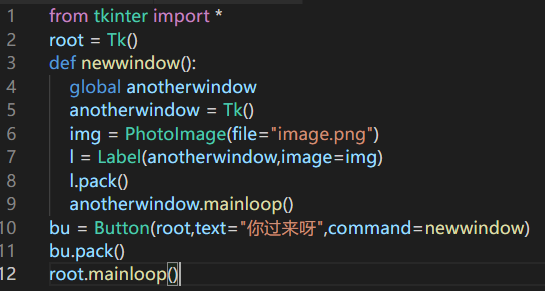
| from tkinter import *
root = Tk()
def newwindow():
global anotherwindow
anotherwindow = Tk()
img = PhotoImage(file="image.png")
l = Label(anotherwindow,image=img)
l.pack()
anotherwindow.mainloop()
bu = Button(root,text="你过来呀",command=newwindow)
bu.pack()
root.mainloop()
|
解决过程
第一种办法:将PhotoImage的定义挪到函数外
修改为:
1
2
3
4
5
6
7
8
9
10
11
12
| from tkinter import *
root = Tk()
img = PhotoImage(file="image.png")
def newwindow():
global anotherwindow,img
anotherwindow = Tk()
l = Label(anotherwindow,image=img)
l.pack()
anotherwindow.mainloop()
bu = Button(root,text="你过来呀",command=newwindow)
bu.pack()
root.mainloop()
|
结果依然报错:
1
2
3
4
5
6
7
8
9
10
| Traceback (most recent call last):
File "C:\Users\lenovo3c\AppData\Local\Programs\Python\Python310\lib\tkinter\__init__.py", line 1921, in __call__
return self.func(*args)
File "f:\Windows\桌面\tst.py", line 7, in newwindow
l = Label(anotherwindow,image=img)
File "C:\Users\lenovo3c\AppData\Local\Programs\Python\Python310\lib\tkinter\__init__.py", line 3177, in __init__
Widget.__init__(self, master, 'label', cnf, kw)
File "C:\Users\lenovo3c\AppData\Local\Programs\Python\Python310\lib\tkinter\__init__.py", line 2601, in __init__
self.tk.call(
_tkinter.TclError: image "pyimage1" doesn't exist
|
为什么呢?这就要用到第二种办法了
第二种办法:子窗口改用Toplevel(基于第一种方法)
修改为:
1
2
3
4
5
6
7
8
9
10
11
| from tkinter import *
root = Tk()
img = PhotoImage(file="image.png")
def newwindow():
global anotherwindow,img
anotherwindow = Toplevel()
l = Label(anotherwindow,image=img)
l.pack()
bu = Button(root,text="你过来呀",command=newwindow)
bu.pack()
root.mainloop()
|
终于不报错了!
其实还有一个方法
第三种方法:将Label放入Frame或LabelFrame中(基于第一种方法)
这种办法不适合这种情景,让我们换一个:
1
2
3
4
5
6
7
8
9
| starting = Tk()
starting.after(3000,starting.destroy)
starting.mainloop()
cfgfinished = False
configure = Tk()
BG = PhotoImage(file="background\iMac 2021 Green_1.png")
bgl = Label(configure,image=BG)
bgl.pack()
configure.mainloop()
|
不知道为啥,已经distroy了依然报错
我们改成这样:
1
2
3
4
5
6
7
8
9
10
11
| starting = Tk()
starting.after(3000,starting.destroy)
starting.mainloop()
cfgfinished = False
configure = Tk()
fr = Frame(configure)
fr.place(x=0,y=0)
BG = PhotoImage(file="background\iMac 2021 Green_1.png")
bgl = Label(fr,image=BG)
bgl.pack()
configure.mainloop()
|
小结
遇到“unknown option “pyimage1/2””时,首先检查PhotoImage是否定义在函数内(最最最重要),再将根窗口内mainloop过程中的其他窗口统统改为Toplevel,如果还不行,就把Label放到随便一个框架里。